


What to Know About Migrating JD Edwards World Software to EnterpriseOne
Organizations running JD Edwards World face a pivotal decision today. With the ending of extended support for World A9.4 this past April 2025, many teams are evaluating how to modernize their ERP platforms, reduce risk, and improve business performance.
Migrating from World to JD Edwards EnterpriseOne allows your organization to take advantage of a modern, web-based architecture, improved reporting, automation, and ongoing Oracle investment. Terillium helps JDE customers determine whether now is the right time to migrate, and how to execute a successful move.
When to Upgrade
Like most big projects, there is usually something that triggers the impetus to make a move. For some, being off support (and the risk associated with that) is keeping executives up at night. For others, it’s a merger or acquisition that prompts the migration process. In other cases, for larger corporations with many locations, the migration is part of a global ERP project rollout.
Other reasons organizations choose to migrate to JDE Edwards E1 from World:
- End user capabilities
- Technology enhancements
- Improved reporting
- New features and functionality
- End of support
- Architecture change
- Cloud hosting
- Business has changed
- Growth – acquisitions or expansions
- Oracle’s investment in JDE
- Improved user interface
- Mobile applications
Building a Roadmap – Planning for the Upgrade
Migrating from JD Edwards World to EnterpriseOne can be a significant step for your business, but careful planning helps ensure the project runs smoothly. Below are the four areas that form the foundation of a successful migration strategy.
1. Project Scope
Before your organization commits to an EnterpriseOne migration, it’s essential to evaluate your business needs and define the scope of work. Terillium helps you determine the level of change needed for your project:
- Like-for-Like Migration – A technical migration that recreates your World system inside E1 with minimal process change.
- Functional Improvement Migration – A migration that improves current processes, reduces manual work, and leverages modern EnterpriseOne functionality.
- Transformational Migration – A business-driven re-design using EnterpriseOne to modernize workflows, eliminate workarounds, and align your ERP with future-state goals.
2. People
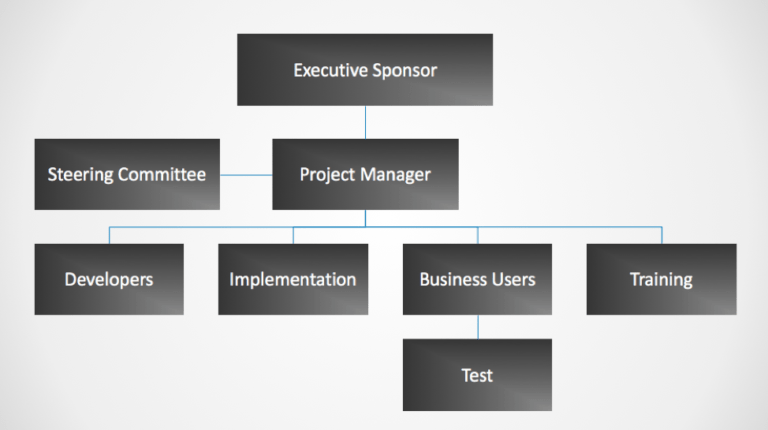
The success of an EnterpriseOne migration depends on your team. Terillium works with organizations to identify:
- Executive sponsors who can champion the project internally
- A dedicated core team to own decisions and support the business
- Subject matter experts across finance, distribution, manufacturing, HR, and more
- Change management needs to prepare users for new processes and tools
Clear communication, strong leadership, and empowered decision-making help ensure a smooth transition.
3. Data
Data is one of the most complex parts of any migration. Terillium provides guidance and best practices to ensure your data strategy supports a successful project.
Key considerations include:
- Historical data access – determining whether legacy data should be archived in-place, migrated in full, or accessed through reporting tools
- Data archiving – since a large chunk of ERP data is typically inactive, reducing what’s converted can lower cost and improve performance
- Data conversion strategy – deciding what to migrate, what to purge, and how to map legacy World data into E1
- Disaster recovery planning – ensuring data integrity throughout the project
4. Tools and Technology
A successful migration includes assessing your current technical landscape and identifying the right tools for your new platform.
Terillium helps organizations evaluate:
- Infrastructure Options – EnterpriseOne offers flexibility. Deploy on-premises or host in the cloud (Oracle Cloud Infrastructure, AWS, Azure).
- Modifications and Customizations – A full inventory of existing customizations helps determine which are still needed and which can be replaced with standard E1 functionality.
- Integrations – Review your current interfaces and determine how to modernize using BSSV, Orchestrator, and service-oriented architecture.
- New EnterpriseOne Features – Explore modern E1 capabilities such as UX One, personalization, automation, mobility, and enhanced analytics, all included in the 9.2 release.
- Licensing Needs – Evaluate existing licenses and determine whether any changes or additions are required as part of the migration.
Oracle JD Edwards EnterpriseOne Features
EnterpriseOne delivers the functionality modern organizations need, and Oracle continues to invest in the platform past 2031.
With EnterpriseOne, you gain access to:
- Modern user experience and role-based dashboards
- Orchestrator automation and workflow improvements
- Mobility and browser-based access
- Improved financial management, procurement, manufacturing, HCM, and capital asset management capabilities
- Embedded reporting and analytics
- Lower total cost of ownership and long-term support
EnterpriseOne is a proven, stable path for JD Edwards customers looking to modernize without leaving the JDE ecosystem
JDE World to E1 Success Stories
Organizations across industries have partnered with Terillium to successfully migrate from World to EnterpriseOne. Projects include:
- Kingston Technology – modernized its 20-year JD Edwards World environment by reducing more than 1,000 customizations, improving visibility across operations, and accelerating financial processes with an upgrade to EnterpriseOne.
- Roto-Rooter – Migrated financial and operational processes to E1 9.2, redesigned security roles, and successfully deployed BI Publisher without disruption.
- Flatiron Construction – Converted more than 327 million rows of data, completed 4,000+ hours of training, and delivered a modernized ERP foundation.
- Irex – Reduced more than 2,000 customizations in World down to ~141 in E1, improving data access and long-term system stability.
Bringing it All Together – Next Steps
- Determine what type of migration you’re planning (technical, functional, transformational)
- Gain internal buy-in
- Begin initial project planning, and building your project team